
A dropped video call during a client meeting, a point-of-sale terminal that freezes at lunch, or cameras that go offline after a Wi-Fi upgrade often point to the same issue: the physical network was never designed for the way the office operates. Vancouver office network cabling is the foundation behind dependable internet, access control, security cameras, phones, workstations, and wireless coverage. When it is planned correctly, employees do not have to think about it. They can simply work.
For offices, retail locations, medical practices, warehouses, and multi-tenant commercial properties, cabling should be treated as long-term building infrastructure. It needs to support current equipment without forcing a costly rebuild every time your team adds a desk, camera, door reader, or wireless access point.
Why Office Cabling Deserves More Than a Quick Fix
A network can appear to work while still being poorly installed. Loose patch cables, unmarked wall jacks, unsupported cable runs, and consumer-grade switches may function for a while, but they create delays when a problem occurs. A technician spends more time tracing connections, moving equipment becomes difficult, and small issues can take down multiple devices.
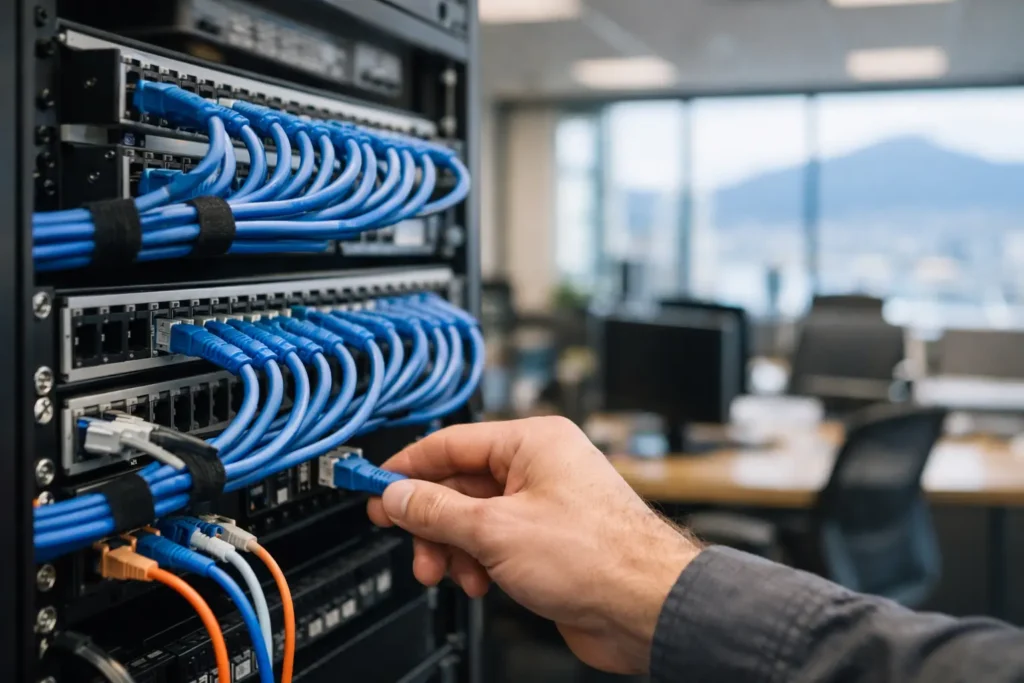
Professional structured cabling gives every connection a defined path from the workstation or device to the communications room. Cables are routed safely, terminated correctly, labeled clearly, and tested after installation. This approach makes the network easier to service, more reliable under daily use, and far more practical to expand.
The trade-off is upfront planning. A basic patch-and-go installation can cost less at the beginning, but it often becomes more expensive when your office grows or troubleshooting starts affecting staff productivity. For a short-term pop-up or temporary workspace, a lighter approach may be reasonable. For an established business lease, a medical office, a warehouse, or a customer-facing location, structured cabling is usually the better decision.
Planning Vancouver Office Network Cabling Around Real Operations
The right design starts with how the space is actually used, not with a generic cable count. A small accounting office has different requirements than a restaurant with point-of-sale devices, guest Wi-Fi, cameras, and digital displays. A warehouse may need coverage across loading areas, mezzanines, and exterior doors. A property manager may need a network that supports cameras, controlled entry, intercoms, and a future tenant expansion.
During a site assessment, the installer should identify where people work, where equipment lives, and where future changes are likely. That includes desk locations, meeting rooms, printers, telecom rooms, server racks, reception areas, camera positions, doors with access control, and wireless coverage zones.
A practical design also accounts for the less visible details: ceiling access, fire-rated pathways, electrical interference, building rules, existing conduits, and the distance between network closets. These factors determine whether copper cabling is sufficient or whether fiber should connect separate floors, suites, or distant areas of the property.
Build for growth, not just opening day
An office rarely stays static. Teams add staff, shift departments, install more cameras, or introduce cloud phones and video conferencing equipment. Leaving spare capacity in pathways, rack space, patch panels, and cable runs helps prevent disruptive retrofits later.
A good rule is to provide more data connections than the immediate floor plan appears to require. A desk may need one connection today, but a second port can later support a phone, docking station, printer, or other wired device without opening walls or running exposed cables across the floor.
Choosing Cat6, Cat6A, and Fiber
Cable category affects speed, distance, heat handling, and future capacity. The best choice depends on the building, the equipment, and the expected life of the installation.
Cat6 is a dependable choice for many standard office connections. It supports gigabit networking and can support higher speeds over shorter distances. For small offices with ordinary workstation, phone, printer, and access point needs, it may be the most cost-effective option.
Cat6A is often the better fit for businesses that want stronger long-term capacity. It is designed to support 10-gigabit speeds over longer runs and handles higher Power over Ethernet demands more effectively. This matters when powering modern wireless access points, high-resolution security cameras, video intercoms, and access control devices through the network cable.
Fiber is typically used for backbone connections rather than individual desks. It is valuable when linking separate network rooms, floors, buildings, or long warehouse runs. Fiber is not affected by electrical interference in the same way as copper and offers substantial bandwidth capacity, but it requires compatible equipment and can add cost. It is most useful where distance, speed, or environmental conditions make copper a poor fit.
Power Over Ethernet Reduces Installation Complexity
Power over Ethernet, commonly called PoE, allows a single network cable to carry data and electrical power to compatible devices. Instead of arranging a separate outlet beside every camera, access point, door controller, or intercom, the device can be powered from a properly designed PoE switch.
This is especially useful in commercial environments where device locations are determined by coverage and security needs, not outlet placement. Ceiling-mounted wireless access points can be positioned for better coverage. Cameras can be mounted at entrances, loading bays, and hallways. Video intercoms and controlled doors can be integrated without relying on a collection of separate power adapters.
PoE is not a reason to overlook design. Switches must have enough total power budget for connected devices, and cable quality matters. High-power equipment can create additional heat in dense cable bundles, which is one reason professional cable selection, routing, and testing are worth the investment.
Keep the Network Room Organized and Protected
The network rack or communications closet is where order pays off every day. A clean installation uses a suitable rack or cabinet, patch panels, cable managers, labeled ports, ventilation where needed, and protected power. It should not be a shelf crowded with unlabeled switches, extension cords, and tangled patch cables.
Clear labeling is one of the simplest and most valuable parts of an installation. Each wall jack, patch panel port, and cable should follow the same naming system. When a staff member changes offices or a device stops communicating, the connection can be identified quickly instead of guessed at.
The room should also be secured. Network hardware provides access to business data, internet service, cameras, door systems, and other critical technology. Restricting physical access, using a battery backup for essential equipment, and keeping rack doors and cable paths orderly all support faster recovery during an outage.
Cabling Should Support Security and Wi-Fi Together
Many businesses treat networking and security as separate projects, then discover that their camera installer needs more network ports or that their access control system requires a dedicated connection at a door. Planning them together avoids duplicate work and makes the final system easier to support.
A properly designed cabling layout can support security cameras, intrusion alarm communicators, access control panels, video intercoms, wireless access points, office phones, and business devices from one organized infrastructure. Network segmentation can then separate business computers from guest Wi-Fi, cameras, and building systems. This reduces unnecessary exposure between devices and makes troubleshooting more manageable.
For example, a retail store may need reliable connections for registers and payment devices, PoE cameras at entry points, staff Wi-Fi, guest Wi-Fi, and remote access to video. A single coordinated design is more efficient than adding each system independently after the walls and ceilings are finished.
What Professional Installation Should Include
The quality of the finished system depends on more than the cable itself. A professional installation should include a site review, a documented cable plan, proper routing and support, clean terminations, patch panel organization, labeling, and performance testing. The final handoff should make it clear which ports serve each room or device area.
Be cautious of installers who quote only a per-cable price without reviewing pathways, ceiling conditions, equipment locations, or the communications room. Pricing by cable run is common, but the scope must account for the work required to install the system safely and correctly.
HTech Knight Security Systems Ltd can coordinate network and Wi-Fi infrastructure with cameras, access control, alarms, and intercom systems, giving business owners one point of contact instead of several disconnected contractors. That is particularly valuable when an office is opening on a fixed schedule or upgrading while still serving customers.
When to Upgrade an Existing Office Network
You may not need to replace every cable just because performance is inconsistent. The first step is to inspect and test the existing infrastructure. Some problems come from aging switches, weak Wi-Fi placement, incorrect settings, damaged patch cords, or inadequate internet service rather than the in-wall cabling itself.
An upgrade becomes more likely when cabling is undocumented, network ports are unreliable, devices rely heavily on extension cords or unmanaged switches, or new PoE equipment exceeds the current system’s capability. Renovations are also the best time to improve cabling because ceilings and walls are already accessible.
If your business is moving into a new Vancouver office, schedule the cabling assessment before furniture, finishes, and equipment arrive. Early planning protects the build schedule and gives every device a proper connection from day one. A clean, tested network is not just an IT improvement – it is a practical way to keep staff productive, security systems available, and your operation ready for what comes next.