
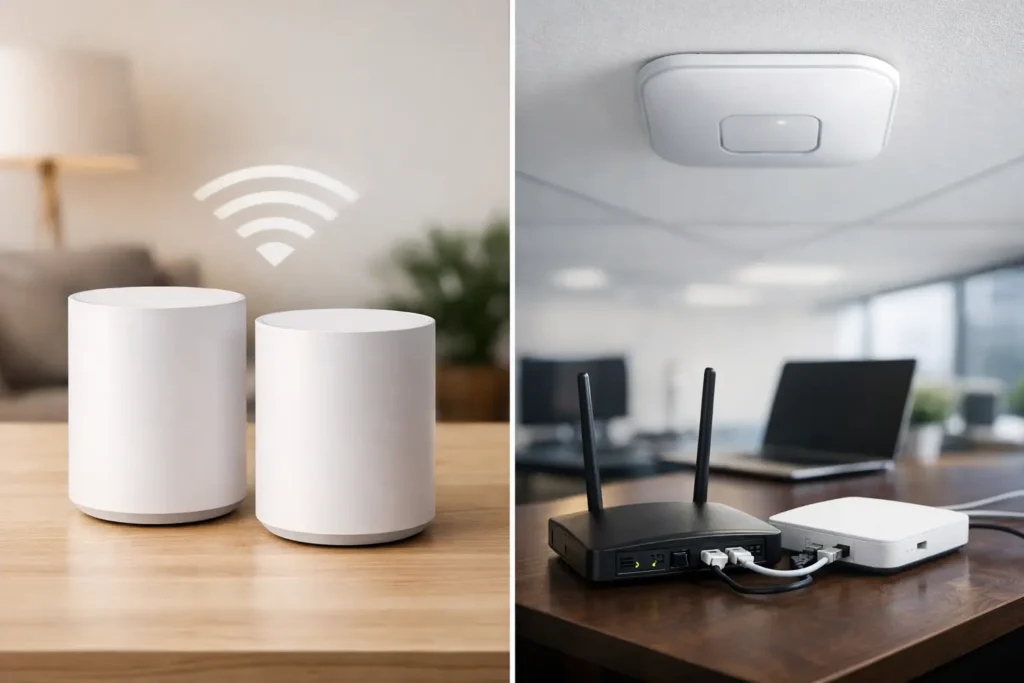
A Wi-Fi dead zone is more than an annoyance when your security cameras, video doorbell, smart locks, or point-of-sale equipment rely on a stable connection. In the mesh WiFi vs access points decision, the right answer depends less on the box you buy and more on your building, wiring, coverage needs, and the systems that must stay online when it matters.
For a small home, a well-placed mesh system can be a practical answer. For a warehouse, restaurant, medical office, large home, or property with multiple cameras, professionally installed access points are often the stronger long-term choice. The difference comes down to how each system carries data and how much control you need over the network.
Mesh WiFi vs Access Points: The Core Difference
A mesh WiFi system uses a main router and one or more satellite nodes. The nodes work together under one network name, extending coverage into areas where a single router cannot reach. Many mesh systems communicate wirelessly with one another, so a node in the basement, garage, or upstairs hallway relays traffic back to the main unit.
An access point is a dedicated Wi-Fi device connected to your network by Ethernet cable. It broadcasts wireless coverage from that wired connection. In a professional installation, the same network cable often supplies power through Power over Ethernet, or PoE, reducing the need for electrical outlets near each access point.
Both options can provide one network name throughout a property and allow phones, tablets, cameras, and other devices to move between coverage areas. The key difference is the backhaul – the path data takes from the Wi-Fi device back to the router, switch, and internet connection. Access points typically use a wired backhaul. Mesh nodes frequently use a wireless one.
That distinction has a direct effect on speed, reliability, and how well the network handles high-demand devices.
When Mesh WiFi Is the Right Choice
Mesh WiFi is a good fit when you need better coverage without opening walls or running network cable. It is often useful in apartments, townhomes, smaller detached homes, or finished spaces where wiring is difficult and the internet connection is moderate.
A quality mesh system can make everyday use much better. You can place nodes near weak areas, keep a consistent network name, and manage basic settings through an app. For households using streaming services, laptops, smart TVs, and a reasonable number of smart devices, this can be enough.
Mesh can also be a sensible short-term solution during a renovation or before a larger network upgrade. However, placement matters. A mesh node cannot repair a poor signal if it is installed too far from the previous node. Putting a satellite in the dead zone sounds logical, but it often means the satellite itself has a weak connection to the rest of the network.
Mesh systems have another important advantage: some support Ethernet backhaul. When each mesh node is connected by cable, it avoids many of the performance limits of wireless relaying. At that point, the practical difference between a mesh system and a managed access point system becomes smaller, though access points usually still provide more control and business-grade features.
Where Mesh WiFi Can Fall Short
Wireless mesh backhaul shares airspace with your devices. In a busy property, that can reduce available bandwidth and add delay. The effect may be minor for web browsing, but it becomes more noticeable with multiple 4K security cameras, video calls, gaming, cloud backups, smart displays, and streaming happening at once.
Construction also matters. Concrete, brick, metal framing, radiant heating, mirrors, appliances, and dense insulation can weaken Wi-Fi signals. A large home with an attached garage, basement suite, patio, or detached workshop may need several nodes, and every wireless hop introduces another potential point of slowdown.
Consumer mesh platforms can also offer limited network controls. That matters when you want to separate security cameras from personal devices, give guests their own Wi-Fi, prioritize business equipment, or diagnose a device that drops off the network. Some advanced mesh systems offer these features, but capabilities vary widely by brand and model.
Why Wired Access Points Lead in Larger Properties
Access points are designed for deliberate coverage planning. Instead of hoping a signal reaches through several walls, an installer places wired access points where people and devices actually need coverage: a main floor, upper floor, basement, warehouse aisle, front office, dining area, or outdoor space.
Because each access point has a wired connection back to the network, it does not need to relay traffic through another wireless device. This gives connected devices a more dependable path for data. It is especially valuable for security camera viewing, cloud recording, video intercom calls, access control management, and remote work.
Managed access points also give property owners more options. A properly designed system can create separate networks for staff, guests, cameras, smart home devices, and administrative equipment. This reduces unnecessary traffic between devices and supports better security practices. If a guest joins the Wi-Fi, that does not mean they should be on the same network as a recorder, smart lock controller, or office computer.
For commercial sites, access points also scale more predictably. A small retail store may need two carefully placed units. A warehouse or multi-unit office can use additional access points connected to managed PoE switches as coverage and device demand increase. The network can grow without replacing the entire system.
Access Points Are Not Automatically Better
Access points require cabling, planning, and installation labor. In a finished home where no cable routes are available, the cost to run Ethernet may outweigh the benefit for a simple coverage issue. A single access point placed in the wrong location can also perform poorly. Better equipment does not replace proper design.
The strongest approach is not to install access points everywhere. It is to assess the building, identify the weak areas, consider the number and type of connected devices, and install only what the property needs.
Security Systems Change the Decision
A standard Wi-Fi setup may feel acceptable until security equipment is added. Cameras, doorbells, alarm communicators, video intercoms, smart locks, and automation hubs create constant network activity. Some devices use little bandwidth most of the time, while others send continuous video or require fast response when someone presses a call button or unlocks a door.
Whenever possible, fixed security equipment should use wired connections. PoE security cameras are a strong example: one network cable provides both power and data, avoiding battery changes and reducing dependence on Wi-Fi quality. The same principle applies to network video recorders, switches, and many access control components.
Wi-Fi still has a place for devices that cannot be wired, including certain video doorbells, smart sensors, mobile devices, and cameras in difficult locations. In those cases, dependable coverage is essential. A network should be designed around the security system, not treated as an afterthought after cameras are already mounted.
How to Choose for Your Property
Start with the building, not the advertised Wi-Fi speed. Consider the size and layout of the space, wall materials, number of floors, outdoor areas, and where the internet service enters the property. Then consider how many devices connect during peak use and which ones cannot afford interruptions.
Mesh WiFi is usually a practical choice if you have a smaller property, limited ability to run cable, and mostly everyday internet use. Choose a system with enough nodes for the layout, and place them where they still receive a strong signal from the main unit.
Access points are usually the better investment if you manage a business, own a larger home, operate several cameras, need reliable outdoor coverage, or want separate networks for guests and security devices. They are also the preferred option when you are renovating or building, since Ethernet cable is much easier to install before walls and ceilings are closed.
A hybrid design can be the right answer as well. You may use wired access points inside the main building and a mesh node with Ethernet backhaul in a difficult-to-wire area. The best system is the one that solves the actual coverage problem without creating new reliability issues.
Plan Coverage Before Buying Hardware
Wi-Fi performance is not determined by the router alone. Placement, cable routes, switch capacity, internet speed, device density, and network settings all affect the result. A professional site assessment can identify signal barriers, coverage gaps, and the best locations for equipment before money is spent on devices that may not fit the property.
For homeowners and businesses across the Lower Mainland, HTech Knight Security Systems Ltd can design Wi-Fi infrastructure that supports the full property system, from security cameras and access control to smart automation and daily business operations. When the network is planned as part of the installation, you get clearer coverage expectations, cleaner equipment placement, and a support path if your needs expand.
The useful next step is simple: identify the devices that must stay connected, map the places where they are used, and choose a network built for that real-world demand.